How much does it cost to build an app? What the figure doesn't tell you
How much should you budget to build an app? The figure alone is not enough: aim for a goal rather than a feature list, with users from the first month.
13 min read

Sébastien Nobour
Founder of DEVEDANOS
A feature flag, or feature toggle, is a switch in the code. Depending on its value, the application takes one path or another. DORA defines it as a conditional statement based on configuration settings (“Working in small batches”).
The tool is simple. The mistakes made with it are less so: they run combinations in production that nobody has tested. Pete Hodgson makes the point in the introduction to his article on the subject: toggles introduce complexity, and you should aim to keep their number down (“Feature Toggles (aka Feature Flags)”, 2017).
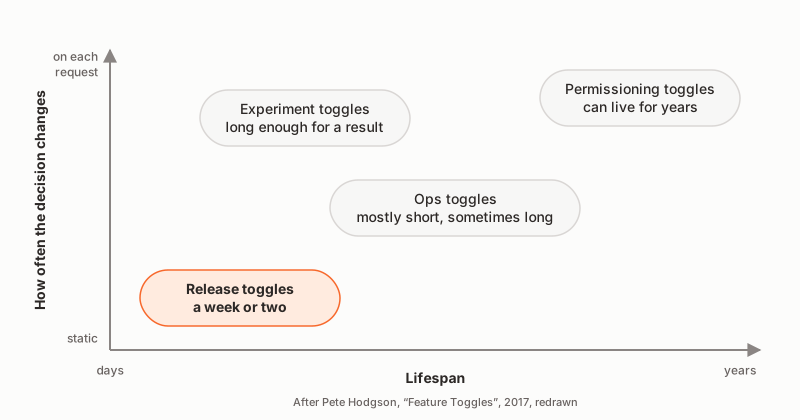
Hodgson sorts toggles into four categories, along two dimensions: how long they live, and how often their decision changes.
Knowing which category a toggle belongs to tells you how long it is allowed to live. Hodgson adds that savvy teams treat their toggles as inventory that comes with a carrying cost, and work to keep that inventory as low as possible.
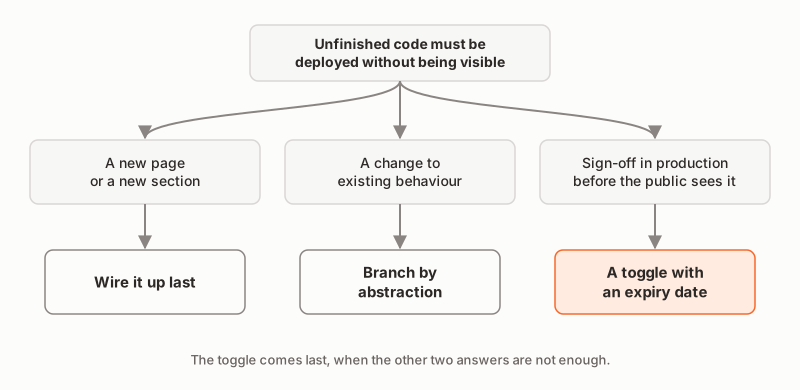
Martin Fowler makes it a rule: release toggles should be the last resort for getting a feature into production. The first choice is to break the feature down so that its pieces can go in safely (“Feature Flag”, 2010).
First technique: wire it up last. You build everything behind the interface, merge it into trunk and deploy it, but nothing leads to it. The last commit adds the entry point, the link or the button, and makes the feature visible. Humble and Farley describe a new interface built at a URL that no link pointed to, then connected piece by piece to the existing navigation. The application kept working throughout (Continuous Delivery, 2010, p. 348). Fowler calls that last piece the keystone interface (“Keystone Interface”, 2020).
Second technique, for changing behaviour that already exists: branch by abstraction. You put an abstraction layer in front of the part to change, build the new implementation alongside the old one, then remove the old one, and sometimes the abstraction itself (p. 349).
That leaves the case where someone needs to see the feature in production before everyone else, to test and sign it off. Here, a toggle is justified. Even then, Fowler advises applying it to the user interface only, so that toggle points do not spread throughout the code.
Why these techniques let you commit unfinished code every day is explained in our article on trunk-based development.
“On in staging, off in production.” The code looks like this:
// Anti-pattern: the decision depends on the environment name.
if (process.env.APP_ENV === "staging") {
  showInvoiceExport();
}
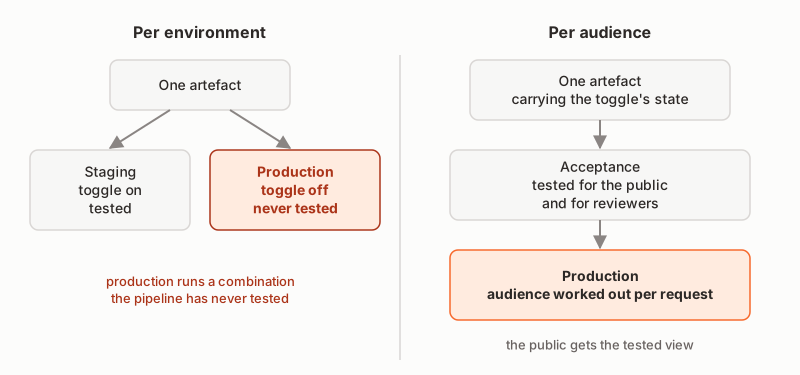
The problem fits in one sentence: production runs a combination the pipeline has never tested. The acceptance tests ran with the switch on; production runs with the switch off.
MinimumCD describes the consequence. Code paths reserved for production are never exercised by the test suite, and if production runs different logic, validation in staging is incomplete by design (“Hard-Coded Environment Assumptions”). Hodgson makes the same point: any environment-specific override runs counter to the ideal of Continuous Delivery, which aims to keep deployable units and their configuration as environment-agnostic as possible. Humble and Farley had already set out the principle: deploy the same binaries everywhere, so that what you release to production is what you tested (Continuous Delivery, p. 42).
Instead: the toggle’s state is part of the application’s configuration, shipped with the artefact, identical in every environment. What varies is the audience, worked out on each request. We come back to this below.
To save time, the team tests with “everything on”. That is tomorrow’s configuration. It is not the one the public gets today.
Hodgson is clear. The most important thing is to test the toggle configuration that will be live in production. It is wise to test the fallback configuration as well. And many teams add tests with every toggle on, to avoid surprise regressions at the next release.
Instead: at least two configurations under test, the production one and the one with everything on.
A release toggle exists to hide work in progress. According to Hodgson, it should generally not stay much longer than a week or two. A toggle that lives for months no longer hides work in progress: it keeps two versions of the software alive, and each one has to be tested.
Instead: an expiry date from the moment it is created, and a test that fails once that date has passed.
Each toggle doubles the number of possible combinations. Two toggles make four; ten make more than a thousand.
Hodgson describes what teams that keep this inventory low actually do. They add a removal task to the backlog as soon as a toggle is created. They put an expiry date on every toggle. Some write “time bombs”, which fail a test, or even refuse to start the application, once the date has passed. Others set a cap on the number of toggles allowed at any one time. Humble and Farley were already giving the same advice: do not keep too many options, and prune them carefully once they have served their purpose (Continuous Delivery, p. 348).
A new page, a new section, a new report: nobody sees them as long as no link leads to them. Adding a toggle to them means paying for the complexity of a switch to get what the missing link already gave you.
Fowler puts it this way: only use release toggles if you can neither release in small pieces nor use a keystone interface (“Feature Flag”).
In 2012, a US brokerage firm lost more than $460 million in about 45 minutes. The order issued by the SEC, the US Securities and Exchange Commission, sets out the sequence of events (administrative order No. 34-70694, 2013, paragraphs 13 to 17).
The new code reused a flag that had once been used to activate an old feature. That feature had been abandoned years earlier, but its code was still there and could still be called. During the deployment, one of the eight servers did not receive the new code. On that server, orders carrying the repurposed flag activated the old code, which no longer worked properly.
Two mistakes added up: a flag whose meaning changed, and dead code that was never removed. Farley cites the same case for a third one, manual deployment, server by server (Continuous Delivery Pipelines, 2021, pp. 112-113). Hodgson presents it as a warning about what happens when toggles are badly managed.
Instead: a toggle has one meaning, for one feature, and goes away with it. A new need gets a new toggle, under a new name. The code the toggle replaces is deleted at the same time as the toggle.
The toggle is evaluated in the browser. The new section is in the page, but hidden by a CSS rule or by the hidden attribute. The content is still sent to every visitor.
The HTML specification spells it out. The hidden attribute is generally implemented with CSS, and can therefore be overridden by CSS. Hidden elements remain active: their scripts run, their forms submit (WHATWG, HTML Living Standard, “The hidden attribute”). Any visitor can reveal what was hidden, using their browser’s developer tools.
Instead: decide on the server. A visitor who is not in the audience simply does not receive the content.
Every toggle raises two questions. What state is it in? Who sees the feature? Mixing the two up is anti-pattern 1.
The state is part of the application’s configuration. MinimumCD files feature flags under configuration internal to the application, which does not vary by environment. That configuration is deployed with the immutable artefact and no longer changes once the artefact is built (“Application Configuration”). The same artefact, with the same state, therefore passes acceptance and then goes to production.
The audience is decided on each request. Hodgson recommends separating the toggle point, the place in the code where the decision is applied, from the logic that makes that decision. He also flags the risk of overrides by cookie, URL parameter or HTTP header: a curious or malicious user can then change the toggle’s state themselves. So the audience is worked out from an identity verified on the server, never from a parameter the browser can forge.
Here is a typed toggle registry, written for this article:
export type ToggleState = "in-progress" | "in-review";

export interface ReleaseToggle {
  name: string;
  state: ToggleState;
  createdOn: string;
  expiresOn: string;
}

export const MAX_RELEASE_TOGGLES = 3;

export const releaseToggles: readonly ReleaseToggle[] = [
  {
    name: "invoice-export",
    state: "in-review",
    createdOn: "2026-10-05",
    expiresOn: "2026-10-19",
  },
];
And the decision, kept separate from the toggle point. The audience comes from the authenticated user, never from the environment name:
export type Audience = "public" | "reviewers";

export interface Viewer {
  roles: readonly string[];
}

export function audienceFor(viewer: Viewer | null): Audience {
  return viewer?.roles.includes("reviewer") ? "reviewers" : "public";
}

export function isVisible(toggle: ReleaseToggle, audience: Audience): boolean {
  return toggle.state === "in-review" && audience === "reviewers";
}
An in-progress toggle is visible to no one. An in-review toggle is visible to reviewers only. There is no “visible to everyone” state: making the feature visible to everyone means removing the toggle.
Two tests are enough to cover anti-pattern 2. The first renders the page as the public receives it, with the configuration actually shipped. The second renders it as a reviewer receives it, with the toggle on. They are written here in the syntax shared by Jest and Vitest; renderInvoicesPage is a made-up function that renders the page on the server.
test("the public gets the page without the invoice export", async () => {
  const page = await renderInvoicesPage({ viewer: null });
  expect(page.text).not.toContain("Export invoices");
});

test("a reviewer gets the page with the invoice export", async () => {
  const page = await renderInvoicesPage({ viewer: { roles: ["reviewer"] } });
  expect(page.text).toContain("Export invoices");
});
The first test protects what the public sees today. The second checks that the feature works before it is made visible to everyone.
A release toggle goes through three stages. It is born with the feature, invisible to everyone. It moves into review, visible to reviewers. Then the release commit removes it, along with the old path if there was one: the condition disappears, and the new code becomes the only path.
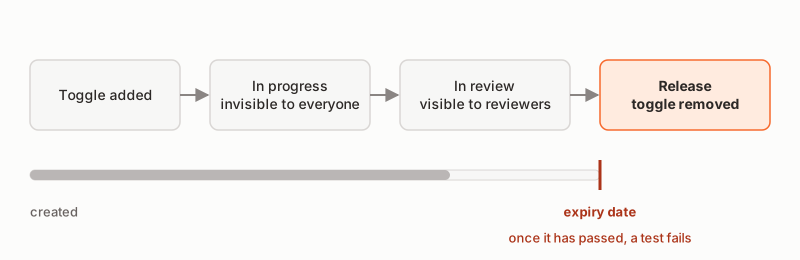
To make sure that end comes, two tests act as the “time bomb” Hodgson describes:
test("no release toggle is past its expiry date", () => {
  const today = new Date().toISOString().slice(0, 10);
  const expired = releaseToggles
    .filter((toggle) => toggle.expiresOn < today)
    .map((toggle) => toggle.name);
  expect(expired).toEqual([]);
});

test("the number of toggles does not exceed the cap", () => {
  expect(releaseToggles.length).toBeLessThanOrEqual(MAX_RELEASE_TOGGLES);
});
The first test fails on the day a date passes, and the pipeline goes red. The team then has two options: release the feature and remove the toggle, or remove the feature. The second test prevents a new toggle from being added while the cap is reached.
For our clients, we use a toggle to sign off a feature in production before it is visible to everyone. This is how we describe it in our approach: “As soon as the feature is signed off, we make the new version visible. The code is already deployed via our automated deployment pipeline and awaits this go-ahead to be activated in production. If you’d rather not delegate this step, you test and approve each feature yourself.”
For custom software development, we work on a fixed budget, invoiced at the end of each month for the work done. Your application is usable within a month. Your teams use it from the first month, and that use decides what we develop the following month.
And so that what worked last month still works this month, we apply the Zero-Regression Guarantee: every regression is fixed and covered by an automated test so that it does not come back, at no extra cost.
In our guide, you will find the questions to ask before signing a software development quote.
Do you need software built, and do you want it built this way? Shall we talk?
How much should you budget to build an app? The figure alone is not enough: aim for a goal rather than a feature list, with users from the first month.
Predictive or adaptive approach? The real dividing line is not between waterfall and agile. It runs between predicting and adapting. What that means for software.
What is an MVP in software? Not version 1 of an application: the smallest test that tells you whether an idea is worth building. And what comes after.