Feature flags: best practices, and seven anti-patterns to avoid
What is a feature flag? Four types of toggles, what to try before adding one, and seven anti-patterns that end up running code nobody has tested.
11 min read

Sébastien Nobour
Founder of DEVEDANOS
Continuous Delivery, Continuous Deployment: there is no shortage of definitions. They tell you what the two practices are. They rarely tell you why they work, in other words why a small change released often carries less risk than a big change released rarely.
This article starts from that question and reports what the sources it cites can answer, as of 2026. It is written for technical leads and developers who want to understand the mechanism, not just the vocabulary.
Continuous Delivery keeps the software ready to go to production at any time. Continuous Deployment sends it there automatically, as soon as the pipeline is green.
In both cases, every change goes through the same deployment pipeline: build, automated tests, checks. Jez Humble and Dave Farley, the authors of the book that defined Continuous Delivery, describe Continuous Deployment as that same pipeline with its last step, the deployment to production, made automatic (Continuous Delivery, 2010, p. 266). Elsewhere, Farley sums it up in a phrase: Continuous Deployment means “automating the decision to release”.
In Continuous Delivery, that decision stays with a person. The software is ready; someone chooses the moment. The two authors add a rule: even when you have good reasons not to release every change, you should work as if you were going to (p. 267).
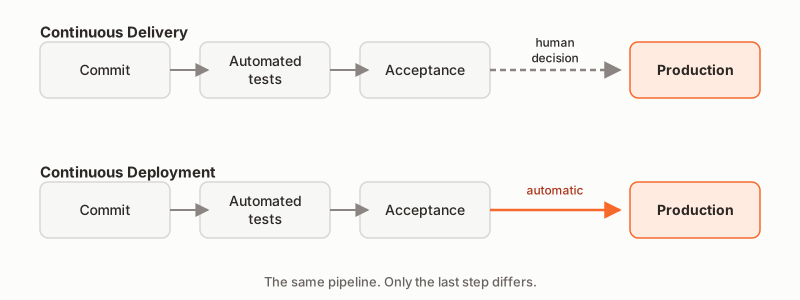
The rest of this article applies to both practices. What they share matters more than what sets them apart: small, frequent changes.
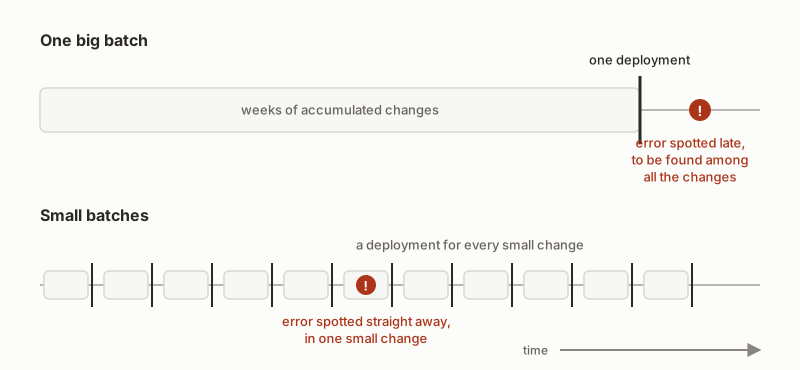
A small change touches few things. If a test fails right after it, the cause lies in that change. The developer who has just written it still has it in mind. They fix it straight away, or they revert their commit.
A big change touches many things. When an error shows up, it hides among all the changes it contains. Finding the cause takes time. Reverting the whole thing also removes what was working.
Farley makes this a founding principle of Continuous Delivery. Small, simple, frequent changes are less risky than big, complicated, infrequent ones. Being simpler, they are easier to understand and easier to revert. Smaller steps mean smaller mistakes and faster feedback (Continuous Delivery Pipelines, 2021, p. 54).
Humble and Farley apply the same reasoning to releases. The more often you release, the less risky each release is, because the amount of change between two releases goes down. If you release every change, the risk is limited to the risk of that one change (Continuous Delivery, p. 267).
The opposite reflex is common: add more controls. Approval by a committee, one more sign-off before every release. Farley describes what follows. Releases become less frequent, so bigger and more complex, so more likely to introduce mistakes (Continuous Delivery Pipelines, p. 110). He quotes the report from DORA, Google Cloud’s research programme on how software is built and released to production: approvals by an external body are negatively correlated with lead time, deployment frequency and restore time, and have no correlation with change failure rate (p. 111).
A small change is not a feature. A feature is built from several commits, each one tested and ready to go to production. Farley puts it this way: build features from multiple commits, so that the product evolves step by step, with frequent feedback from users. And if a feature is too big, break it down into smaller pieces (Continuous Delivery Pipelines, p. 55).
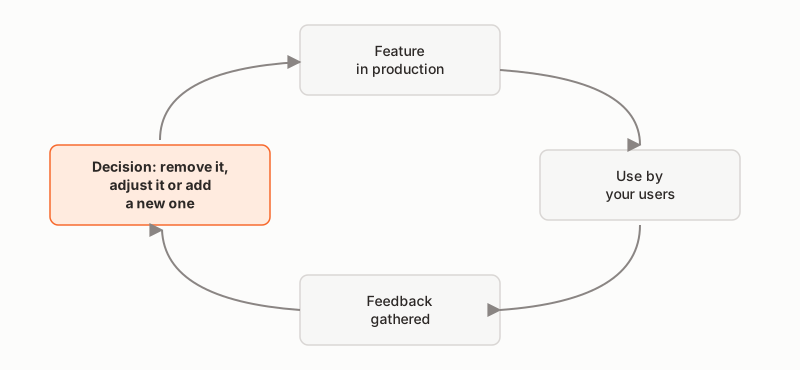
For him, a change is only complete when it is in the hands of its users (p. 6). That is where small steps pay off. Each feature quickly reaches the people who use it, and how they use it shows whether it was worth building.
This is the loop we describe in our approach: “As soon as a feature goes live, the feedback we gather from your users tells us what to do next: remove it, adjust it, or add a new one.”
That leaves the question of what to break down, and in what order. We do not break work down by estimated duration. We ask a single question: what is the most useful thing to do now? A time estimate remains a guess; we explain why in the article on software projects that go over budget.
A feature built from several commits goes through intermediate states. A half-built screen must not appear to users. Do you have to wait until it is finished to deploy? No. You only need to separate two actions.
Farley draws the line in a 2020 article, “Are we ‘Deploying’, ‘Releasing’ or ‘Delivering’?”:
In everyday speech, “going to production” often covers both. At DEVEDANOS, we keep “release” for the second one. We deploy code continuously, then release the feature once it has been signed off.
Farley points out that you can deploy changes that are not yet ready for use. From this, he derives a working rule: every commit must be safe, tested and ready to deploy to production, even when the feature it contributes to is not ready yet (Continuous Delivery Pipelines, p. 55).
How does deployed code stay invisible? Humble and Farley describe one solution. The new code is deployed with everything else, but no link leads to it until it is finished; it is wired up last (Continuous Delivery, p. 348). When that is not possible, there is the feature toggle, a switch in the configuration, which we cover in the article on feature flags.
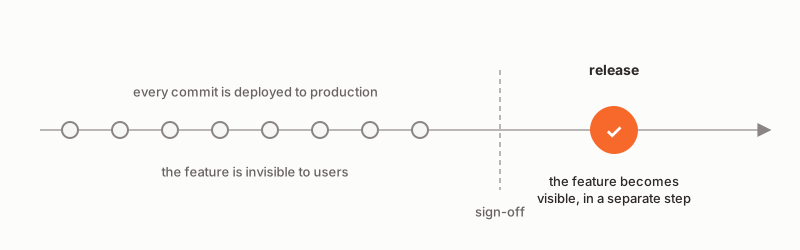
For our clients, this separation makes it possible to sign off a feature before it is released. This is how we put it in our approach: “As soon as the feature is signed off, we make the new version visible. The code is already deployed via our automated deployment pipeline and awaits this go-ahead to be activated in production.” On the go-ahead, we add the link to the feature last, or we switch its feature toggle.
Working in small steps does not remove errors. It makes them small, and quick to spot. That still requires fast feedback.
Farley gives three timescales, which he presents as his rules of thumb (Continuous Delivery Pipelines, p. 121):
Why revert rather than investigate? If the problem is not understood, or takes too long to fix, you revert the change. That gives you time to think, and keeps the pipeline free for everyone else (p. 56).
When the change is small, reverting removes only that change. The history stays readable:
$ git log --oneline -6
9c41e2a Revert "Calculate the discount on the total including tax"
7d0f3b1 Calculate the discount on the total including tax
5a8e6c4 Show the discount breakdown on the invoice
3b27d90 Reject a discount larger than the order amount
1f9a5e7 Add the discount field to the form, not wired up
0c62b18 Save the discount entered on the order
Fictional history, written for this article.
The pipeline that makes this pace possible, and the rule that stops everything when it is red, are described in the article on trunk-based development.
The DORA research programme tracks software delivery performance with five metrics, split into two groups (“DORA’s software delivery performance metrics”).
Throughput:
Instability:
DORA writes that speed and stability are not a trade-off: for most teams, these metrics are correlated.
The book Accelerate (2018), by Nicole Forsgren, Jez Humble and Gene Kim, brings together four years of “State of DevOps” surveys, from 2014 to 2017: more than 23,000 responses from more than 2,000 organisations. Nicole Forsgren led those surveys. In the 2017 survey, compared with the lowest performers, the highest performers deployed 46 times more often. Their lead time from commit to deploy was 440 times shorter. After an outage, they restored service 170 times faster. Their changes failed five times less often (Accelerate, 2018, chapter 1). Over several years of surveys, their organisations were twice as likely to exceed their goals for profitability, market share and productivity (chapter 2).
Farley quotes other figures on Continuous Delivery from the 2014 and 2017 “State of DevOps” reports: a 50% lower change failure rate, 44% more time spent on new features and 21% less time spent on unplanned work and rework (Continuous Delivery Pipelines, p. 4).
Small batches affect both groups. According to DORA, working in small batches reduces the time it takes to get feedback on changes, which makes it easier to diagnose and fix problems (“Working in small batches”). The 2024 report repeats it: DORA’s data has shown for years that larger changes are slower and more prone to creating instability (Accelerate State of DevOps 2024, p. 40).
These are correlations drawn from surveys, not proof of cause. To date, in the studies cited here, they are consistent with the mechanism described above.
We develop in small changes, deployed continuously, and released once our clients have signed them off.
For custom software development, we work to a fixed budget, invoiced at the end of each month for the work done. Your application is usable within a month, with a few essential features: your users start working with it straight away, and how they use it determines which features come next. Once a feature has been signed off and released, it is judged on how your users respond, and we decide the next ones with you right away, for as long as you wish. An application is never finished.
And to make sure that what worked last month still works this month, we apply a zero-regression guarantee: every regression is fixed and covered by an automated test so that it does not come back, at no extra cost.
In our guide, you will find the questions to ask before signing a quote for developing your custom tool.
Do you need software built, and want it built this way? Shall we talk?
What is a feature flag? Four types of toggles, what to try before adding one, and seven anti-patterns that end up running code nobody has tested.
How much should you budget to build an app? The figure alone is not enough: aim for a goal rather than a feature list, with users from the first month.
Predictive or adaptive approach? The real difference is not between waterfall and agile, but between predicting and adapting. What that means for software.